

Missed follow-ups cost enterprises more than they realize. A delayed response after a sales call, a support ticket that goes quiet for three days, or a post-purchase message that never arrives — each one chips away at customer trust and revenue. Manual processes simply cannot keep pace when your team is managing thousands of interactions across email, SMS, WhatsApp, and live chat simultaneously. This guide walks you through exactly how to design, implement, and optimize automated multi-channel follow-up workflows that deliver consistent engagement, free up your team's time, and produce measurable improvements in customer retention and satisfaction.
Table of Contents
- Understanding automated customer follow-up workflows
- Key components and tools for workflow automation
- Step-by-step: Automating your customer follow-up process
- Troubleshooting and optimizing your automated workflows
- What most automation guides miss about enterprise follow-up
- Take your automated follow-up to the next level
- Frequently asked questions
Key Takeaways
| Point | Details |
|---|---|
| Manual follow-ups limit scale | Automating customer follow-ups removes bottlenecks and improves consistency for enterprises. |
| Combine AI and workflow tools | Use conversation intelligence and workflow automation platforms together for smart, multi-channel engagement. |
| Validate and constrain outputs | Always validate extracted data and strictly control AI-generated messages to prevent errors and maintain relevance. |
| Monitor and optimize continually | Regularly refine your processes and tune workflows based on real-world feedback and performance metrics. |
Understanding automated customer follow-up workflows
Automated customer follow-up workflow automation, in an enterprise context, means using software to detect specific customer interaction signals and then trigger the right message, on the right channel, at the right time — without requiring a human to initiate each action. It is not just scheduling emails. It is a connected system that listens to what customers say and do, interprets intent, and responds intelligently across multiple touchpoints.
Manual follow-up processes carry significant hidden costs. Agents forget to send post-call summaries. Support tickets fall through the cracks during peak hours. Marketing teams manually segment lists and send batch messages that feel generic and arrive too late. These delays do not just annoy customers — they signal disorganization and reduce the perceived value of your brand.
The business case for automation is strong. Automated workflows deliver:
- Consistency: Every customer receives the same quality of follow-up regardless of which agent handled the interaction.
- Speed: Messages go out within seconds of a trigger event rather than hours or days later.
- Scalability: A single workflow can handle thousands of simultaneous interactions without additional headcount.
- Personalization at scale: When connected to conversation intelligence, messages reflect the actual content of each customer interaction.
Operational automation can be coupled with customer conversation intelligence systems that analyze interaction signals and trigger follow-up actions into downstream workflows and tools such as Zapier, Make, and n8n integration, which means your follow-up system can be as contextually aware as your best human agent.
Here is a quick comparison of manual versus automated follow-up approaches:
| Dimension | Manual follow-up | Automated workflow |
|---|---|---|
| Speed | Hours to days | Seconds to minutes |
| Consistency | Varies by agent | Uniform every time |
| Scalability | Limited by headcount | Virtually unlimited |
| Personalization | High but time-intensive | High with AI integration |
| Error rate | High under volume | Low with validation |
| Cost per interaction | High | Low at scale |
The multi-channel dimension matters enormously here. Customers do not live in one channel. They might start a conversation via live chat, receive a follow-up via SMS, and expect a summary in their email inbox. A well-designed automated workflow spans all of these touchpoints without requiring separate manual actions for each one.
Key components and tools for workflow automation
With a clear definition of automated workflows in mind, the next step is understanding what you need and which tools can make it all possible.

A complete enterprise follow-up automation stack has four core components working together. First, you need a signal analysis layer that captures and processes customer interactions — call transcripts, chat logs, support tickets, or CRM events. Second, you need intent detection and extraction, which identifies what the customer actually needs based on the content of those interactions. Third, you need a workflow trigger and routing engine that decides which follow-up action to take and when. Fourth, you need delivery channel integrations that push the message out via email, SMS, WhatsApp, or other platforms.
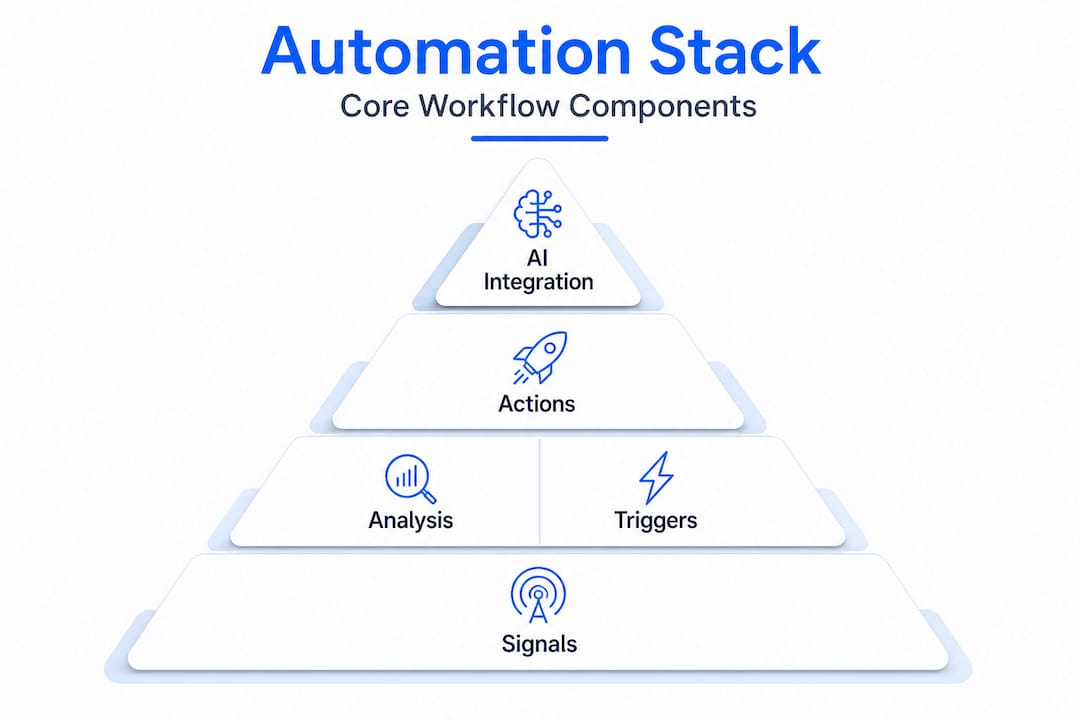
AI postmaster automation ties these components together in a way that makes the entire system feel seamless rather than stitched together from disconnected tools.
Enterprise conversation-triggered follow-ups can be built by extracting structured context from transcripts, validating extraction confidence, and generating a tightly constrained follow-up message. This means the quality of your follow-up is directly tied to how well your extraction layer works. Garbage in, garbage out — but accurate extraction paired with validated output produces follow-ups that customers actually find useful.
The most commonly used integration platforms for connecting these components are:
- Zapier: Best for teams that want fast, no-code connections between popular SaaS tools.
- Make (formerly Integromat): Offers more complex logic and branching for sophisticated workflows.
- n8n: An open-source option that gives engineering teams full control and self-hosting capability.
Here is a comparison of leading tools by use case:
| Tool category | Example platforms | Best for |
|---|---|---|
| Conversation intelligence | Call analytics platforms, AI transcription tools | Signal extraction and intent detection |
| Workflow automation | Zapier, Make, n8n | Trigger routing and logic |
| CRM integration | Salesforce, HubSpot, Zoho | Customer data and history |
| Messaging delivery | SMS gateways, WhatsApp APIs, email providers | Multi-channel output |
| AI message generation | LLM APIs, fine-tuned models | Contextual message drafting |
Pro Tip: Start with modular, API-compatible systems when building your stack. Proprietary closed systems might seem easier to set up initially, but they create painful bottlenecks when you need to add a new channel or swap out a component 18 months from now.
Step-by-step: Automating your customer follow-up process
Once you have selected your system components, you are ready to put your automated follow-up machine into action. Here is how to do it step by step.
-
Map your trigger events. Identify every customer interaction that should generate a follow-up. Common triggers include completed support calls, abandoned shopping carts, post-purchase confirmations, appointment completions, and unresolved ticket closures. Be specific — "call ended" is too broad, but "call ended with unresolved issue flagged" is actionable.
-
Define the desired follow-up action for each trigger. Not every trigger needs the same response. A resolved support ticket might warrant a satisfaction survey via SMS. A sales call might require a personalized summary email with next steps. Map each trigger to a specific action and channel before you build anything.
-
Connect your conversation intelligence tools to your workflow platform. This is where workflow automation steps become critical. Use webhooks or native API connectors to pipe interaction data from your call recording, chat, or CRM system into your workflow engine in real time. Test this connection thoroughly before moving forward.
-
Configure intent detection and confidence validation. When using AI or LLM-based extraction, set a confidence threshold below which the system flags the interaction for human review rather than sending an automated message. This prevents low-quality or context-mismatched follow-ups from reaching customers. Model-based follow-up benefits from structured extraction with validation and strict output constraints to reduce hallucinated or context-mismatched follow-ups in enterprise settings.
-
Integrate your delivery systems. Connect your CRM, email provider, SMS gateway, and messaging apps to the workflow engine. Ensure that customer contact preferences are respected — if a customer has opted out of SMS, the system should automatically route to email instead.
-
Run a small-scale pilot. Before rolling out to your full customer base, test with a controlled segment. Monitor every message that goes out, review customer responses, and look for any triggers that are firing incorrectly or generating irrelevant messages.
-
Iterate and expand. Use what you learn from the pilot to refine trigger logic, improve extraction prompts, and tighten message constraints. Then scale gradually.
"The most reliable enterprise follow-up workflows are not the most complex ones — they are the ones where every step has been validated, every output constrained, and every failure mode anticipated before the first real message goes out."
Operational automation can be coupled with customer conversation intelligence systems that analyze interaction signals and trigger follow-up actions into downstream workflows and tools, which means your workflow engine does not need to make guesses — it acts on structured, validated data.
Pro Tip: Always constrain AI-generated messages using a strict template or output schema. Allow the model to fill in specific variables like customer name, issue summary, and next steps, but lock down the overall structure and tone to prevent off-brand or inappropriate content from slipping through.
Troubleshooting and optimizing your automated workflows
Even after deployment, your workflow requires care and vigilance. Here is what to watch out for and how to keep your automation on track.
Common mistakes to avoid:
- Misconfigured triggers: A trigger set too broadly will fire on every interaction, flooding customers with messages. Audit your trigger conditions regularly, especially after CRM updates or system migrations.
- Low-confidence extractions: If your AI extraction layer is producing low-confidence results frequently, the underlying model may need retraining or your prompt design needs tightening. Enterprise follow-ups built on structured context extraction require ongoing validation to stay accurate.
- Context drift: Over time, customer interaction patterns change. A model trained on last year's support conversations may not accurately extract intent from this year's interactions. Schedule periodic retraining cycles.
- Channel fatigue: Sending follow-ups on too many channels simultaneously annoys customers. Respect channel hierarchies and customer preferences.
Metrics to track:
- Open rates and click-through rates for email follow-ups
- Response rates for SMS and messaging app follow-ups
- Customer satisfaction scores correlated with follow-up timing
- Escalation rates (how often automated follow-ups trigger a human handoff)
- Message accuracy scores from periodic manual audits
Compliance and privacy requirements cannot be treated as an afterthought. Regulations like GDPR in Europe and TCPA in the United States impose strict rules on automated messaging. Always capture and store consent, honor opt-out requests immediately, and ensure your data processing agreements with third-party tools are current.
Continuous improvement means building feedback loops into the workflow itself. When a customer responds to a follow-up, that response should feed back into the system to improve future extractions. When a follow-up generates a complaint or opt-out, flag it for review and trace it back to the trigger that caused it.
Pro Tip: Set up a dedicated monitoring dashboard that flags any follow-up message where the AI-generated content deviates significantly from the expected template structure. Context-mismatched or hallucinated messages are far easier to catch in a dashboard than in a customer complaint email.
What most automation guides miss about enterprise follow-up
Most automation guides focus almost entirely on tool selection. They walk you through connecting platform A to platform B, show you a screenshot of a workflow diagram, and call it done. What they skip is the part that actually determines whether your automation succeeds or quietly erodes customer trust over 18 months.
The real danger in enterprise follow-up automation is not a broken webhook. It is a workflow that technically works but sends subtly wrong messages at scale. A follow-up that references the wrong product. A summary that misidentifies the customer's core complaint. A message that arrives in the right channel at the right time but says something that makes the customer feel misunderstood. These failures are hard to detect in dashboards and devastating to customer relationships.
This is why structured extraction with validation and strict output constraints are not optional features — they are the foundation of any enterprise-grade system. Most teams underinvest here because it feels like an engineering detail rather than a business priority. It is both.
The other uncomfortable truth is that enterprise automation never reaches a "set it and forget it" state. Customer language evolves, product lines change, support issues shift, and the AI models that power your extraction layer need to keep up. The teams that succeed long-term are the ones that treat their automation workflows as living systems requiring regular attention, not infrastructure that can be deployed and ignored.
We have also seen teams make the mistake of over-trusting their automation because the early metrics looked good. Open rates were up, response times were down, and leadership declared victory. Then, six months later, customer satisfaction scores started slipping because the follow-up messages had gradually drifted out of alignment with actual customer needs. Healthy skepticism of autopilot promises is not pessimism. It is good engineering practice.
Take your automated follow-up to the next level
Ready to see these best practices in action? A purpose-built platform accelerates your results and multiplies the value of your efforts.
SendStackr AI Postmaster brings together the conversation analysis, workflow automation, and multi-channel delivery capabilities that enterprise teams need in a single, integrated platform. You get a drag-and-drop workflow builder that connects directly to your CRM, AI-powered message processing with built-in validation, and real-time delivery across SMS, WhatsApp, and notifications — without requiring a single line of custom code. Whether you are scaling a customer support operation or running high-volume marketing follow-up sequences, SendStackr gives you the infrastructure to do it reliably, compliantly, and at enterprise speed. Start automating smarter and watch your engagement metrics respond.
Frequently asked questions
What are the biggest challenges in automating customer follow-up workflows?
The main challenges are extracting accurate context from conversations, reducing irrelevant or hallucinated messages, and keeping workflow triggers reliable at scale. Enterprise follow-ups require structured context extraction with confidence validation and tightly constrained message generation to stay accurate.
Which tools integrate best with enterprise customer intelligence platforms?
Workflow automation tools like Zapier, Make, and n8n offer strong integration points for enterprise conversation intelligence systems. Conversation intelligence platforms can trigger follow-up actions into these downstream tools in real time.
How do I prevent inappropriate or off-topic AI-generated follow-up messages?
Use strict extraction validation and prompt constraints to keep all automated follow-ups tightly focused and accurate. Structured output constraints reduce hallucinated or context-mismatched follow-ups significantly in enterprise settings.
What performance metrics should I track for my automated follow-ups?
Monitor open rates, response rates, and message context accuracy to evaluate workflow effectiveness. Escalation rates and periodic manual audits of AI-generated content are equally important for catching quality issues before they affect customer satisfaction scores.